Business · Doha New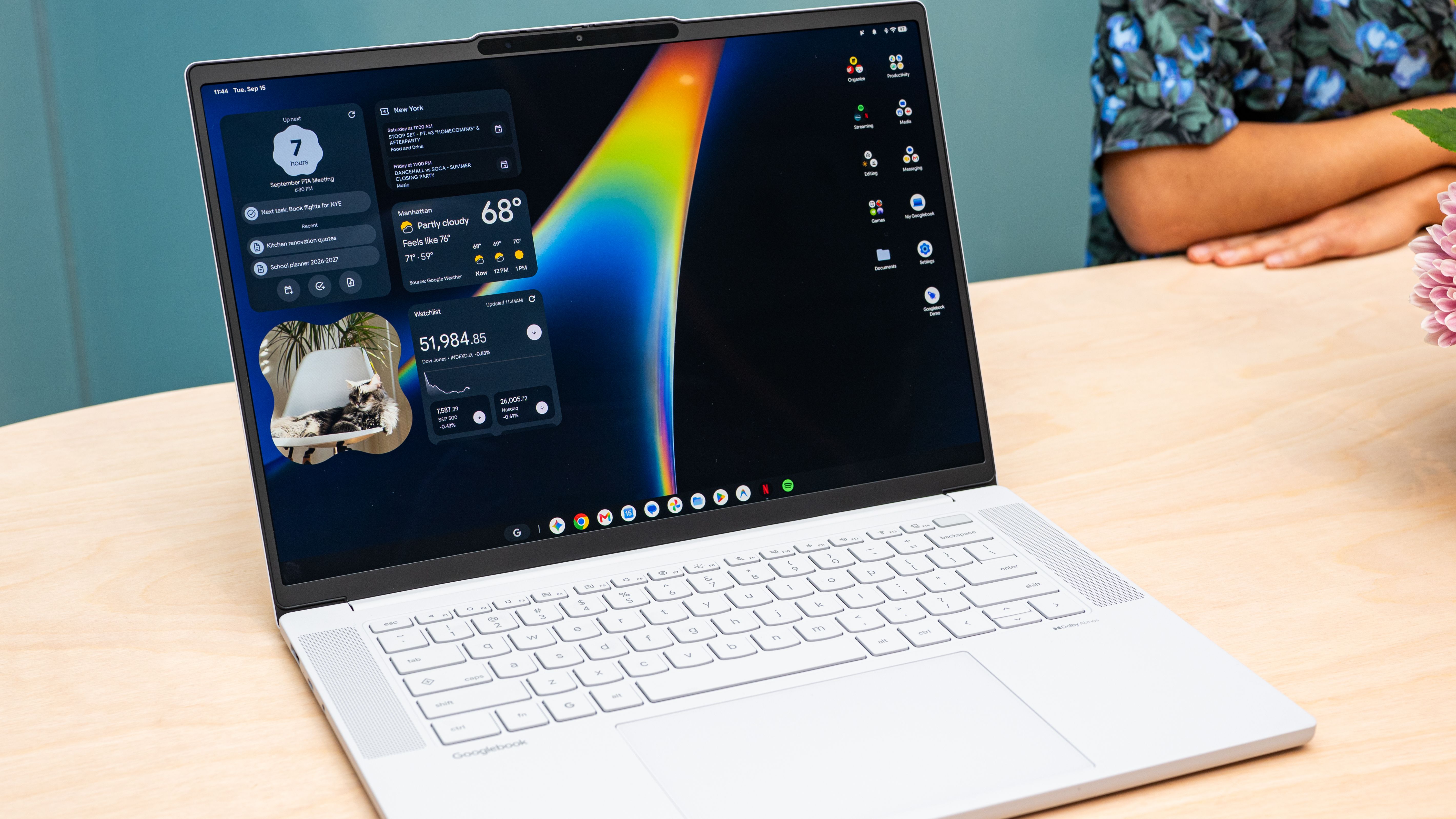
iPhones and Macs are like two peas in a pod. Apple’s hardware synergy means you can launch iPhone apps right from the macOS desktop , respond to texts without picking up your iPhone, and even copy text on one platform and paste it on the other. That kind of seamless connectivity does not natively exist for Android phone owners at the operating system level.
Google’s trying to change that with Googlebooks , a new class of laptop. First teased in May , the company finally shared more details about the new OS at a media-only event in New York City last week. Like with Android , hardware manufacturers can make their own Googlebooks, provided they hit specific standards set by Google.
Today marks the launch of five new computers that comply with the Googlebooks standard, one each from HP, Dell, Lenovo, Acer, and Asus. These machines are powered by either Qualcomm’s Snapdragon X Elite chip or Intel’s Core Ultra 3 (MediaTek also supports the Googlebook platform with its new Dimensity CX C10 Max chip, but none of the new laptops use the chip yet). Preorders open today, and the machines hit store shelves on October 4, starting at $899.
Every purchase includes a full year of Google AI Pro service with 5 terabytes of storage. Here are the new laptops, all of which are clamshells except the Acer, which is a 2-in-1 machine : Acer Googlebook 14 ($899) Dell XPS Googlebook ($1,199) HP Googlebook 14 ($1,299) Lenovo Googlebook 15 ($1,299) Asus Googlebook 14 ($1,299) Some of the standards Google has set include using “premium materials,” like aluminum, magnesium, or carbon fiber, to make them lightweight. They need at least 16 GB of RAM, deliver more than 45 tera operations per second (TOPS) , a touchscreen (LCD or OLED), a backlit keyboard, a haptic trackpad, Dolby Atmos speakers, studio-quality microphones with noise cancellation, and at least 14 hours of battery life.
Googlebooks will receive 10 years of software updates. They must feature the Glowbar—the signature LED strip on the laptop’s exterior that identifies the machine as a Googlebook. It’s a callback to the glowbar Google used on its original Chromebook Pixel . (Speaking of which, Google hasn’t shared whether it’s making its own Googlebook under its Made by Google Pixel hardware division.) Developers can access the Glowbar to customize the lights to specific actions in their apps, and there’s also an Easter egg app consumers can unlock to customize the light color and animation themselves.
Like HiLight introduced on the latest Pixel phones , the Glowbar will illuminate when you talk to Gemini. Googlebooks have a slightly custom keyboard with a G key for Gemini, and the Caps key doubles as the Quick Insert key. Photograph: Julian Chokkattu “There’s a lot the laptop gets right, but much of it was designed decades ago, before mobile devices were invented,” Sameer Samat, president of the Android ecosystem, said at the event.
“Reinventing laptops is a multi-year endeavor. Our first step is to focus on the Android community because today there isn’t a laptop that is designed to seamlessly work with your Android phone.” Googlebook merges Android’s mobile-first operating system with ChromeOS, the OS powering Chromebooks . Google says Chromebooks aren’t going anywhere and will continue to serve schools and act as the budget-friendly option for consumers.
While the Googlebook interface feels like a blown-up version of Android, it’s not just an Android-powered desktop. Rather, it’s a distinct OS optimized for x86 and ARM chip architectures. What’s particularly interesting is how Android apps work on the device.
They’re categorized in three ways. When you set up your Googlebook with your Android phone, important data flows seamlessly to the laptop, including Wi-Fi networks, passwords, settings, messages, contacts, and photos. Not all of your phone apps will automatically be installed, though, as Google deems some apps as “better on the web," like Facebook. (You can still install the Facebook app if you want and get the mobile-shaped experience.) There are three ratings for apps on the Google Play Store: Made for Desktop, Optimized for Desktop, and Better on the Website.
Photograph: Julian Chokkattu The next tier of Android app is “Optimized for Desktop.” These apps take advantage of the bigger screens with better layouts and a little more functionality. The final tier is “Made for Desktop,” like the desktop versions of Chrome. Google says around 20 or so apps are either optimized for desktop or made for the desktop so far, including CapCut, Adobe Photoshop, Notability, and Fantastical .
As the platform grows, Google expects more developers will target Android’s “Made for Desktop” tier and bring their desktop-grade apps from Windows and macOS to Googlebook. People want to play games on their laptops, and so Google says you’ll be able to access more than 20,000 titles on the Play Store, many of which support cross-device play between mobile, tablets, and laptops. Google says around 50 of the 100 top titles are optimized for keyboard, trackpad, and touchscreen.
But since you can’t download AAA games for Googlebooks (yet), especially without a discrete GPU , Google is offering 1 year of Nvidia’s GeForce Now game streaming service, which is optimized for the platform. New Frontiers Googlebook is an opportunity for Google to bring artificial intelligence to the forefront of the laptop computing experience, which is why many of the core new features are AI-powered. For example, similar to Android 17 , you can generate your own desktop widgets with simple prompts to Gemini.
Magic Pointer is the marquee Gemini feature. Wiggle the mouse pointer over anything, and a Gemini overlay will suggest contextual actions. For example, if you wiggle over an event someone invited you to, you’ll get a prompt to automatically “Create an event” and have it added to your Google Calendar with one tap.
Or if you’re wondering what breed of dog you’re looking at (whether it’s a video or photo), wiggle and ask Gemini, “What’s the breed?” If you’re wondering whether an email is a phishing attempt, wiggle over it and ask Gemini. Wiggle your cursor anywhere, and the Magic Pointer will do its thing and understand the context of the area you select. Photograph: Julian Chokkattu AI companies are also heavily focused on voice-to-text as the future of computing , which is why Google is injecting its Rambler feature natively into Googlebook.
It debuted on the latest Google Pixel 11 smartphones and is a potent AI-powered voice dictation engine that transcribes whatever you say. It intelligently cuts your “ums” and “uhs,” and even knows when you make a mistake and restate something, keeping the parts it believes you want to convey. You can ask it to format sentences in a particular tone, include bullets or emoji, and even mix in different languages.
You can call up Rambler with Google’s Quick Insert key , a key found on Googlebook keyboards and newer Chromebook keyboards. Rambler works in any text field. The rest of the platform leans heavily into Android smartphone continuity.
In the Files app, context-aware search lets you find photos by simply typing “dog” instead of the file name—and it searches files on your phone just as easily as local storage. Meanwhile, “Continue on” hands off ongoing tasks so apps open on your laptop right where you left off on mobile, and an app-casting feature lets you stream phone-only apps like DoorDash directly to the desktop. What if you have an iPhone?
Google offers a new “Link to iOS” app that lets users access messages and some notifications on the desktop, but cross-platform limitations mean you can’t enjoy the same breadth of features. Then again, iPhone owners will probably stick to Macs. At least Android now has something comparable.
Source: WIRED